BGMI UC Purchase - Buy BGMI UC Online with Cashback
BGMI UC Purchase
UC Purchase
Top up your BGMI account with Unknown Cash (UC) directly through UC Purchase. No voucher codes, no redeem steps.
Just enter your BGMI User ID, pick a UC pack, and the credits land in your account instantly.
UC Purchase offers both one-time bonus packs (with up to 100% bonus UC) and standard packs, so you can grab skins, the Royale Pass, outfits, and weapon upgrades without the hassle. All transactions are digital, single-use, and processed in real time.Read less
Online only
Single use
View all T&Cs
How to redeem
How do I find my BGMI User ID?
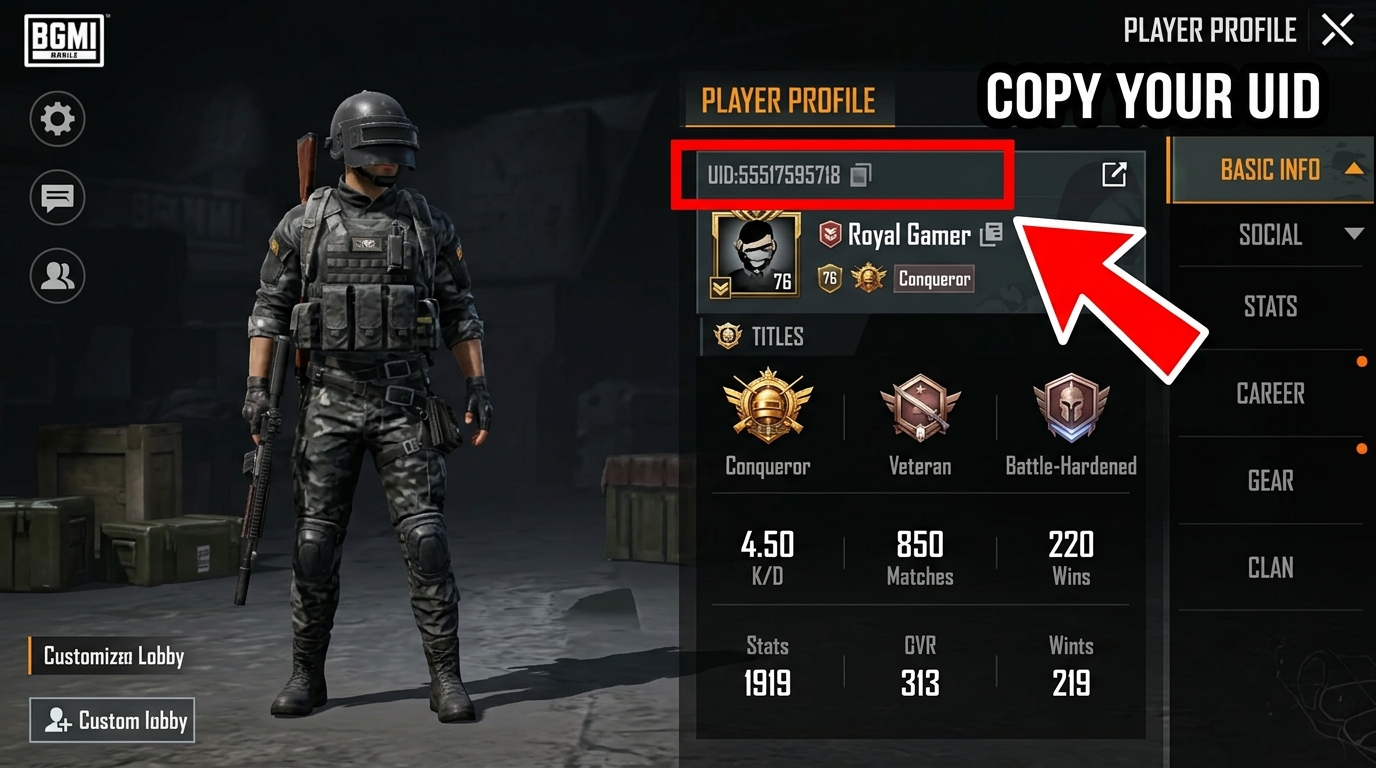
Open BGMI and enter the lobby. Tap on the profile picture and navigate to Basic Info. You will see a numeric User ID above the profile picture. Make sure to copy or enter the correct numbers before making the purchase, instead of using your in-game name.
Frequently asked questions
How does the UC top-up work?
Enter your BGMI User ID on this page, choose a UC pack, and finish the payment. The UC will be added directly to your in-game account. No redemption code required.
How long does delivery take?
Most top-ups are delivered within a few minutes of successful payment. In rare cases, it may take up to 24 hours. If you don't see the UC in your app, please restart the app and check again.
What should I do if I entered the wrong User ID?
UC credited to another account cannot be reversed or transferred. Please double-check your BGMI User ID before confirming the purchase.
Can I gift UC to someone else?
Absolutely! You can buy UC for any BGMI player. If you're purchasing for the first time, simply enter your friend's BGMI User ID and their UC will be topped up directly. If you've already saved your own BGMI ID from a previous purchase, tap "Change" on the BGMI ID section, enter your friend's ID, and proceed with the purchase. The UC will be delivered to whichever ID is shown at checkout.
What payment methods are accepted?
We accept UPI as well as debit and credit cards. The available payment methods will be displayed at checkout.
Payment done but UC not received, what should I do?
Wait about 30 minutes, then check whether the UC has been credited to your BGMI account. If it still hasn't arrived, contact support with your order ID and BGMI User ID.
How do I redeem a BGMI UC voucher?
Tap on "Have a BGMI Gift Voucher Code". Enter your voucher code and 6-digit PIN and tap on "Add". Your matching UC pack will appear with "Redeem now" button. Tap on "Redeem now", and UC gets credited to your account. No payment needed.
Will I get cashback on a voucher order?
No. Cashback does not apply to voucher-based purchases.
What if my voucher isn't working or UC wasn't credited?
Check your voucher code and 6-digit PIN for typos. If the voucher is expired or already used, it cannot be reactivated. If you completed the order but UC wasn't credited, contact us on WhatsApp with your order ID and we'll resolve it right away.
The Ultimate Destination for BGMI UC Purchase
Looking for the fastest and most secure way to complete your BGMI UC purchase? You have found the absolute best platform. At UC Purchase, we specialize in providing players with instant, reliable, and premium UC purchase BGMI services. Whether you want to unlock the latest Royale Pass or upgrade your weapon skins, our BGMI UC top-up process ensures your Unknown Cash is delivered directly to your account in seconds without any hidden steps.
Why Buy BGMI UC in India with Us?
We understand that players need a trusted BGMI UC purchase website. That is why we offer 100% secure payments via UPI, making it incredibly easy to buy BGMI UC in India. Forget about complicated voucher codes or long waiting times; with our online BGMI UC purchase system, you simply enter your Player ID and checkout. As a premium bonus BGMI UC purchase website, we continuously strive to offer the best value, ensuring that every purchase BGMI UC globally or locally is a flawless experience. Start your BGMI UC top-up today and dominate the battlegrounds!
Enter your BGMI user ID
Invalid Player ID. Must be between 7 and 14 digits.
Account Verified
Player ID...
Username...
How To Find Your User ID in BGMI
Open BGMI and wait until it is fully loaded.
Tap on the Profile Icon.
When you go to the profile section, you will find BGMI User ID (UID).


 Online only
 Single use